Monday, 5 March 2012

Design for Digital Media: Breif


University of Kent at West Kent College
HND / HNC Graphic Design
Year 1,  Term 2
Project:  iPhone Apps
Module: Design for Digital Media 15 credits

Date Set: 28th Feb 2012
Submission:  Thursday 15th March Late work will be capped at 40% pass


Preamble
Non verbal communication in the form of pictograms, ideograms and symbols has been with us for thousands of years, and even our modern Latin alphabet is little more than symbols that have evolved over the past several thousand years. Today signage is designed with immediacy in mind, the message or instruction has to be communicated with speed: eg. consider motorway signage.

The focus of this project is upon non-verbal communication, although you are permitted to use some typography where appropriate. 

Graphic design is mostly about sending the right message to the right group of people, usually to persuade, educate and inform. The latter of these is what this project is concerned with.

As well developing your computer skills, this project will help you develop your ability to make concrete complex abstract concepts and reduce them to their simplest visual forms whilst retaining meaning.


The Brief
You are to research and design seven icons for Apps for the iPhone.  Present planning and development for each icon in your sketchbook.

A digital company has produced seven Apps in a series. Each icon should demonstrate the concept of the theme but the icons should also show by their design that they are part of a series.

The seven Apps are all measuring devices:
·       Speedometer
·       Pedometer
·       Decibel metre
·       Barometer
·       Thermometer
·       Anemometer
·       Altimeter

You should use the correct measurements and carefully consider the very small scale of the Apps icons. You should also show in your sketchbook the navigation or usability of your App but the App does not need to actually function.

As well as producing seven icons for Apps you should also provide in your sketchbook a competent navigation /usability plan and some thumbnails for the actual pages of one of the above Apps. You do not need to produce final designs for these but your sketchbook work must demonstrate the elements of interactivity within an App.


Learning Outcomes
The specific Learning Outcomes for the module, against which you will be assesses are listed on Moodle and in the Course Handbook. You are strongly advised to make yourself familiar with these and to ensure that throughout your work you are providing evidence of how you have achieved these. Labelling the evidence for each outcome in your sketchbook is highly advised.

Research
You will have to research, amongst other things, non-verbal communication, ideograms, pictograms and icon design.

Research: Apps

What is apps?

Apps is an abbreviation of applications, these can be anything interactive from education, games or information. They are usually used on electronic software that can be connected to the internet to download or play online. Most known apps are Iphone apps used for a mobile phone by Apple. This is because the Iphone is the most advanced phone which is able to play and use very complicated apps, usually made for computers.


When where apps first created?

No ones knows when the first application was created, although the word app became popular in the year 2010, and was also awarded word of the year by the American Dialect Society. This was when smartphones was being distibuted world wide, and these phones could have applications added to them by buying them from apps stores. Apple Iphone app store first opened on July 10, 2008. This shows that the first app on a mobile phone must have been around the year 2007 - 2008. After apple started creating the iphone and other devices that allow apps, other companies started to open their own app store like;
- Google Play: Opened in October, 2008
- Blackberry App World: Opened in April, 2009
- Ovi Store: Opened in May, 2009
- Windows Phone Marketplace: Opened in October, 2010
- Amazon Appstore: Opened in March, 2011

Examples of Apps:

I'm am going to research examples of apps, or the style, how they are laid out, and the icons they chose to suit the app. I will also be looking out for apps that are in packages, so the style of each app will be similar, to match that they are by the same company/designer. I will not just be looking at apps for mobile phones, although for computers as well, as this will widen my search, and give me more information, and inspiration about apps.


It is important that the creator designs the apps in the same style, this is because people will know instantly that it is by the same designer. This will bring in more customers, as they will be easier to find, also if the designers first app was reliable, and with a high rating, people will more likely to use his/her other apps.


Here is a couple of apps for the Andriod mobile phone, all these apps are created by different designers, as the icons are not the same. All the icons are the same length and width, and most of them are in a square shape but rounded off. For example; 
1. Where's M...,
2. SwiftKey X...,
3. S-Banking.


These apps are rounded, although box shape-like. Most of the icons are small cartoon graphics of a clip in the app. Others are the logo of the app, and other icons are very obvious such as number 9 (music player).


One important aspect when designing my own icon for my apps, is that I must remember to not create a very detailed icon as app number 10; is detailed and because of this you can't see clearly what the image is.


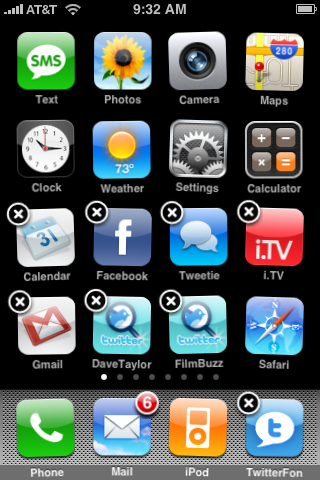
This image shows the default apps that come with the Apple Iphone. All these apps are from Apple, so they all have the same style, showing that they come from the same owner/designer. They all are rounded off at the edges, and all of them show the light reflection in the middle of the app. You can see this better and to more of an extreme on some apps than the others. For example; all the bottom apps has this effect added to them, and you can see this easily. 


I think this is a good way to show the public that the apps are from the same creator, by adding a glare effect to the icon. I think this looks interesting, and effective to the look of the icons.


Here is a set of apps created by the same person; Arrioch. They have added a bevel edge to all their icon apps, so that people will know that this is created by the same person. 


Here are apps from facebook, showing you the difference of what the apps can look like by different companies. These icons are much more square, and not rounded off the edges like Iphone apps, also they have not got any added affect over the top of the icons like the iphone apps.


Here is have got the adobe icons used in the creative suite 4. I am using this image as this shows how adobe have changed their icons to all the same effect, just changing the colour and lettering so you know what application it is. I think this is a good idea to use, and will keep in mind to when I am creating my own.


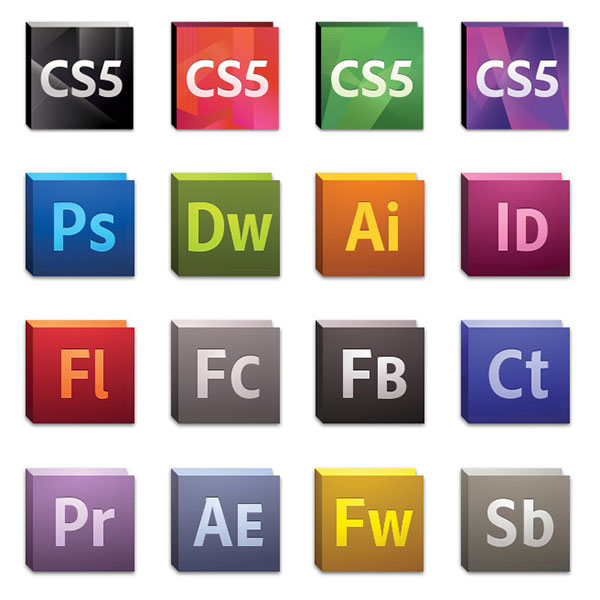
This is the icons adobe used for the CS5 suite, as you can see they update their icons to change with the current style in the industry. They have only done subtle changes to the shape and colour, although you can still see the previous version of the icons still in there. I think this is well thought out, and a good job.

Research: Pictograms

What is a Pictogram?
Google Dictionary:
A pictogram is an ideogram that shows its meaning though its imagery resembling to the physical object. (An Ideogram is a written character that symbolising the idea of a thing without indicating the sounds used to say it, e.g., numerals and Chinese characters)
  
When was the first Pictogram?
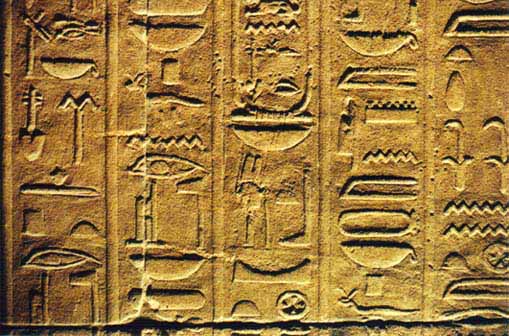
Early Written symbols were based on pictograms and idograms. Many languages used pictograms to write, or give information. Languages such as; ancient Egypt and the Greek alphabet. The first symbols that would be used to describe something were first seen around 2000 BC. This was the alphabetical language of the Egyptians, hieroglyphs. Most other alphabets had evolved from this, or were inspired by its design. One language most of all that followed the design of the hieroglyphs was the Greek alphabet. In the third century they had found a script that had involved three languages, Hieroglyphics, Hieratic script and the Greek Alphabet.


Are Pictograms still used today?

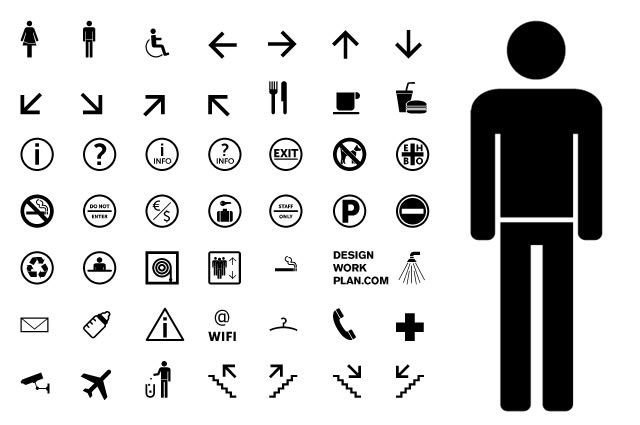
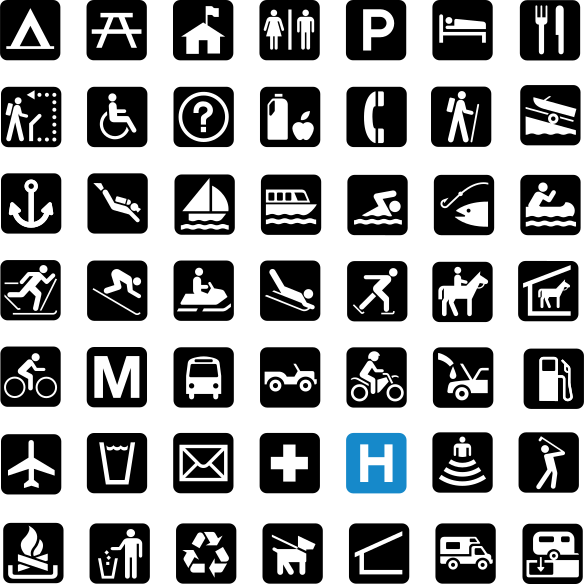
Pictograms are still used as insturctions, representational signs. Becuase of the simplistic style of dawings, and the ease of understanding the drawings, these are oftern used world wide as toilets, or directions on signs at airports, train staions, bus stations and any widly used public areas. A standard set of pictograms were defined and used (International standard ISO 7001) which gives public information.
Here are images showing you the International standard ISO 7001 pictograms:

wikimedia.org
http://www.tiresias.org
These pictograms they are very easy to read, and to understand I will keep ion mind that my icons will try to look very simple, and easy to read.

Research: Denotation & Connotation


Denotation & Connotation:

Denotation:

Denotation is a direct meaning or meanings of a word or an expression. This can be distinguished from either an idea or ideas, or a meaning that can be associated with it. You can also distinguish the meaning or idea/s from a suggestion as well. Denotation can also signify something specific such as column; a row to writing giving you information or describing something. Denotation from a graphic point of view can be a symbol which can show the viewer information, or an order. For example a hand pointing, giving you a directional command, or a road sign showing you what is coming up ahead.


A denotation would be useful for a graphic designer because this would give information to the viewer in a way that is quick and easy to understand, while also being often universally understood to reach the wider audience. By using imagery denotations also accomplish an aesthetical appeal, all these factors contribute to the audience remaining interested and not becoming bored.  Road signs are a brilliant example in showing a denotation in a symbol, as these have to be read quickly, and be understood easily.

Denotations are very useful, and if used well can cleverly be understood by a wide public audience to simplify something of wider or greater meaning.

Connotation:

Connotation is a secondary meaning or association made from a word or expressions primary meaning. For example; colour can give different emotions or feelings towards the viewer that mean more than the colour itself. Red has several connotations that can be; danger, anger and love.

Understanding connotations is extremely important to any graphic designer because adding effects to a design can change the whole outlook of the image. For example; if you use graffiti styled typeface on a garden center advert will not work, because this typeface has connotations associated with gangs, vandalism and youths. An appropriate typeface for this advert would be a light, flowing text to relate to the flowers, and the mature age group. The target audience is involved when considering different connotations for font, colour and imagery etc. Understanding how your audience perceives and understand a design is essential for knowing if what you have designed is achieving its purpose.

Research: Facebook vs Bebo & Myspace

Why is Facebook is used a lot more by users than Bebo, and Myspace? These social network sites have been online and running for a very long time, although why is Facebook used a lot more? My reason for this is because Bebo, and Myspace had a specific target audience, these were for ages that were far younger than the target audience of what Facebook aimed at. Bebo and Mysapce had applications that you could add to your front page for other users to see; this became a fashion in the social networking world, as more and more younger users added these applications that could have been music players (playing their favourite music), animation backgrounds, and online clocks. I think this was one of the main reasons why they was not successful as Facebook. To show you an example of the young target
audience attractions was Bebo ‘love’. This was a little gimmick that Bebo had where you gave ‘love’ to the people you really liked. The example shown to the bottom left of the image (169 Bebo love). I think this shows how much this social networking website has become very ‘childish’, whereas Facebook has none of these silly attractions to the profile page. Facebook has also developed a lot more compared to Myspace and Bebo. Facebook has applications such as games, quizzes, polls, and official webpages for companies. For example; Toyota Prius, Simcity and Top Gear. Facebook also has a much better navigation system, which is user friendly unlike Bebo and Myspace. There are many variations of Facebook layout that the user can change for their own preference.
Written by Scott Vincent

Research: Facebook Questionnaire

We created a questionnaire to find out answers about Facebook users. Here are the questions we posted, and the results we received.

 First we wanted to know what sex uses Facebook the most. We found that mostly Females use Facebook.
 We then wanted the know the age range of Facebook users. This also gave us the most popular age range of Facebook users.
We wanted to know if they use Facebook often, the results shown showed that 94.9% use Facebook everyday.
This question goes in to more detail, asking how long do they spend on Facebook.
 We wanted to know the main reason of why they use Facebook, they could select multiple answers, and the results show that most of them is to contact friends.

The main reason for this question is do they use Facebook during school, work hours. Do the sign on multiple times during the day. Most people that use Facebook, use it once they are at home.
 We wanted to know the security of peoples main user profile. Because of they high security on every website now, we wanted to see if people were effected by this. The results say that they are, and the security does matter on their profile.


This was a following question from the previous one, we wanted to know that once you friend a user on Facebook, do they care that the friend can see your details on Facebook? Most of the answers show that they do care, and most likely only show a specific number of friends, or they do not add personal details.


We wanted to know do they use the Facebook applications, this was the main reason of doing the questionnaire, and the previous questions we to know more information about the users of Facebook. Facebook applications are mainly on any device that can be connected to the internet, excluding computers, such as; Windows or Mac's.


We know wanted to know what devices do they use to connect to Facebook, they could choose multiple answers, although most use computers to connect to Facebook. This was surprising as, they amount of compatible devices that you can use to connect to Facebook is huge compared to computers. The next answer was smartphone. This was predicable, although we would thought that this could have been first on the list.

Research: Facebook for Mobiles


http://www.ortwin-oberhauser.com
So what makes the difference? What makes Facebook more Successful?

I think the secret behind the Facebook Success is the truth that Facebook does one thing better than all other Social Media Service, Facebook better motivates Users to act on Facebook, the Hot Triggers on Facebooks, that call the Facebook Users to action are amazing.
BJ Foggs Behavior Model shows that three elements must converge at the same moment for behaviour to occur: Motivation, Ability, and Trigger. When behaviour does not occur, at least one of those three elements is missing.
Using the Behaviour Model as a leader, web workers can detect what stops users from performing behaviours that they seek. For example, if users are not performing target behaviour, such as rating hotels on a travel web site, the Model helps to see what psychological element is lacking.
By Scott Vincent


by Henri Moissinac on Thursday, September 3, 2009 at 8:32am

Even when you're away from your desktop, we want you to be able to share and connect with those that matter to you on Facebook. We had that goal in mind when we launched Facebook Mobile in 2006. Today, we reached a new milestone with more than 65 million people now actively using Facebook on their mobile devices — a significant increase from 20 million just eight months ago.
As we celebrate 65 million, we want you to be able to take Facebook with you wherever you go. That's why we are continuously making updates to our mobile products and working with some of the biggest names in mobile to make sure that Facebook is available on the latest devices and mobile operating systems.
Facebook Mobile first started as a simple mobile site in English with a few of the core site features built in, such as status updates and photo uploads. Since then, we've grown far beyond what was then a fairly basic mobile site. We have translated the mobile site into other languages, launched Facebook SMS and deployed a wide range of applications for hundreds of mobile handsets, including Facebook for Blackberry, Facebook for iPhone and Facebook for Nokia.
Below is a quick tour of all of your options for using Facebook Mobile:
Mobile Web Sites
Facebook has two mobile web sites: m.facebook.com, which works on any mobile browser, and x.facebook.com, which is designed specifically for touch screen phones like Android, Palm, iPhone and Nokia. These sites have been translated into more than 60 languages and allow you to update your status, browse your News Feed and your friends' Profiles, comment or "like" stories, and view or update your Facebook Page.
Text Messages
Through Facebook Mobile Texts, you can receive notifications, set your status and send and receive messages via SMS. This service is now available on 52 operators in 25 countries, on any mobile phone.
Facebook Mobile for Devices
Facebook applications can be found on an increasing number of mobile phones; many come pre-installed while others can be downloaded from the Internet. The most recent Facebook mobile applications include major updates for Apple's iPhone and Nokia's N97 and 5800. These applications make it easier to update your status, share photos, browse your News Feed and keep in contact with all your friends on Facebook wherever you are.
Also available are Facebook applications from INQHTCLG ElectronicsMotorolaPalmRIMSamsung and Sony Ericsson. There are also Facebook applications for the T-Mobile Sidekick and phones powered by Microsoft's Windows Mobile.
Facebook Connect for Mobile Web
Beginning today, you'll start to see Facebook Connect available on some of your mobile sites and applications, just as you would on the Web. Already, Facebook Connect makes it easier for you to take your online identity with you all over the Web, share what you do online with your friends and stay updated on what they're doing. Soon, you'll see prompts for Facebook Connect on mobile sites and applications and have the opportunity to take your Facebook profile information, friends and privacy preferences to your favorite mobile applications, as well.
By Sam Aylard